All invoices can be reviewed and paid directly in your Alcove portal here. You can also view a full list of your upcoming and scheduled rent payments on your MyAlcove page.
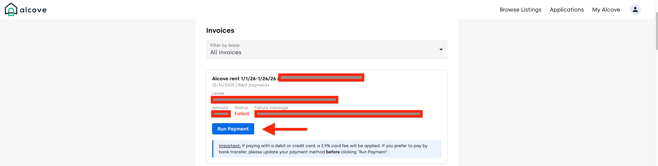
If your rent payment fails on the initial attempt, you can retry the payment by navigating to the unpaid invoice in your portal and clicking the “Run Payment” button next to the invoice you wish to pay. Tenants do not need to wait for the system to attempt the charge again, manual retries can be submitted at any time.
Please note that Alcove’s payment system automatically retries failed rent payments on a set schedule: 3 days, 5 days, and 10 days after the original due date. However, payments made more than 5 days after the due date are subject to a 5% late fee and next steps in accordance with Alcove’s delinquent rent policy.
If you are experiencing issues submitting your payment, please email support@alcoverooms.com for assistance.