
Alcove manages security deposit returns through our Resolution Center. Landlords must process deposit returns within 30 days, or provide interim accounting that extends the process to 60 days.
Once a deposit refund is initiated, you’ll receive an email from Alcove with the subject “Alcove Security Deposit Refund Processed by Landlord”. This email will notify you of the deposit refund and direct you to your Alcove portal to review your landlord's itemized deductions.
To view details and dispute the return, follow these steps:
- Login and go to 'My Alcove' in the top right corner of your account.
- You will see the itemized deductions from your landlord under the "Deposit" section and an option to open a dispute.
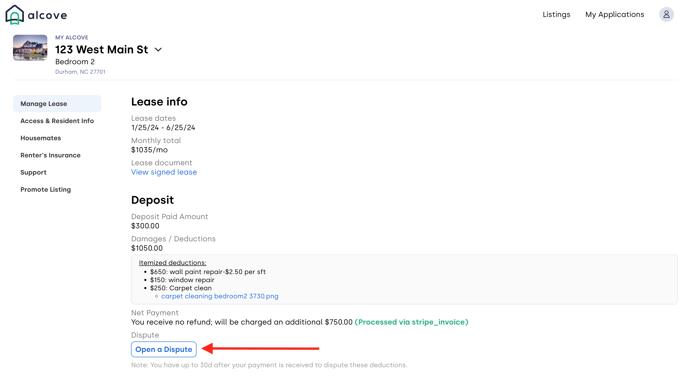
By submitting a dispute, you are requesting an increase in your deposit refund amount. You will need to provide evidence supporting your dispute.
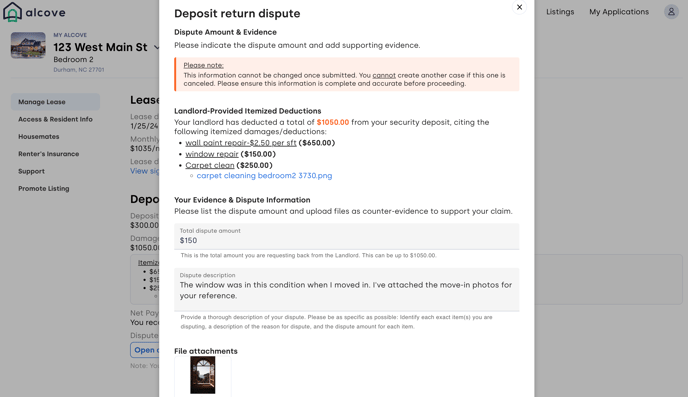
After submitting your dispute and evidence, the landlord will be notified, and a Resolution Center case will be opened.

In the Resolution Center, the Landlord can:
- Accept the proposed deduction amount,
- Propose an alternative deduction amount, or
- Close the dispute.
If a resolution is reached, Alcove will facilitate any additional refunds or payments between you and the landlord.
If no resolution is reached through the Alcove platform, you may continue communicating with your landlord to seek an agreement. If you remain dissatisfied with your landlord’s final decision (or if both parties are unable to reach a final agreement) you have the option to pursue the matter in small claims court.